


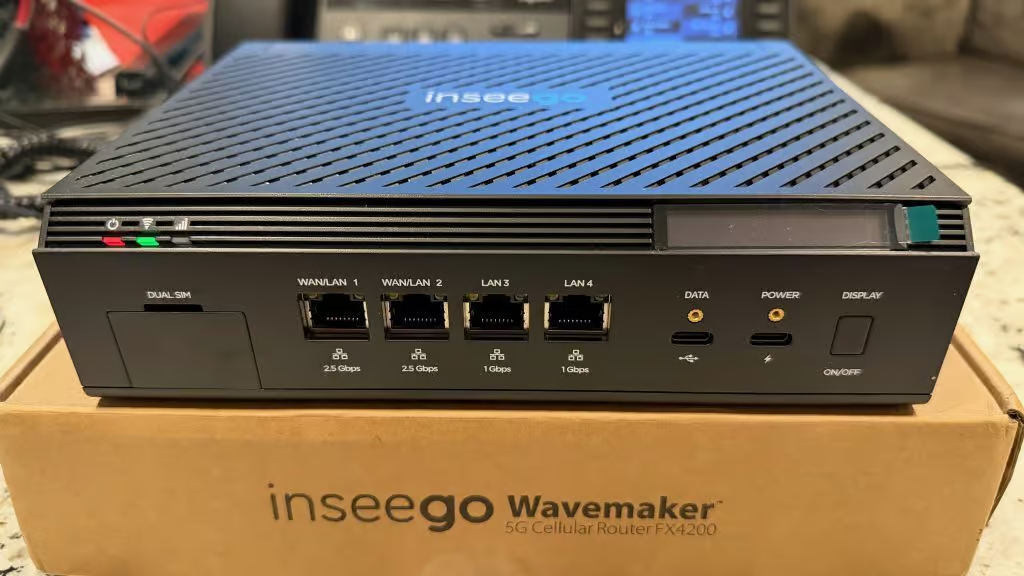

If you have been waiting for a 5G fixed wireless solution that feels like an enterprise router instead of a bigger hotspot, the new Inseego Wavemaker FX4200 paired with the X700 mesh nodes is worth a serious look. Together they bring 5G NR, modern WiFi, and easy mesh expansion into a single, cloud managed platform that can scale from a small office to a distributed retail, warehouse, or campus environment.
Below we walk through what makes the FX4200 different, how the X700 mesh fits in, and which use cases this combo is designed to solve.
FX4200 at a glance
The FX4200 is an indoor 5G cellular router that combines:
- 5G NR with LTE fallback for coverage gaps
- High performance WiFi access point for up to 256 WiFi clients
- Dual SIM support for multi carrier resilience
- Integrated rechargeable battery for backup and easy placement testing
- Cloud managed configuration and monitoring through Inseego Connect, plus a local Inseego mobile app
Under the hood, it uses a powerful multi core platform designed for fixed wireless access, with multi gigabit 5G performance when network conditions allow.
Unique capabilities that set FX4200 apart
Here are some of the key features that make the FX4200 stand out in the 5G router crowd.
Modern WiFi for high density environments
Many 5G routers still ship with older WiFi standards. The FX4200 steps up with a high performance WiFi radio that is built for dense client environments, providing:
- Dual band operation (2.4 GHz and 5 GHz)
- Support for up to 256 WiFi clients
- Full power access point with mesh support to extend coverage using X700 nodes
This is ideal for busy offices, retail floors, classrooms, hospitality, and any space where dozens of devices connect at once.
Multi gigabit 5G performance with smart fallback
On the cellular side, the FX4200 supports 5G NR with advanced carrier aggregation and 4×4 MIMO. When 5G service is strong, you can see multi gigabit downstream speeds and very high upstream throughput.
If 5G is not available, the router automatically falls back to LTE. That means your site stays online even when it is outside 5G coverage or during maintenance events on the 5G network.
Dual SIM, dual WAN and battery backup for uptime
The FX4200 is designed for business continuity, not just best effort connectivity. It includes:
- Two nano SIM slots so you can run two carriers and fail over between them
- Dual WAN support so you can fail over between cellular and a wired WAN connection on one of the Ethernet ports
- A built in battery that keeps the router up through short power outages and allows you to walk around and test signal quality before choosing a permanent location
These capabilities make the FX4200 a strong fit for branches, retail locations, construction trailers, and home offices where downtime is costly.
Ports and antenna flexibility
On the back of the FX4200 you will find:
- Two 2.5 GbE RJ45 ports, often used for LAN and high speed WAN or wired backhaul
- Two 1 GbE RJ45 ports for additional LAN devices
- One USB Type C for data, plus a separate USB C power input
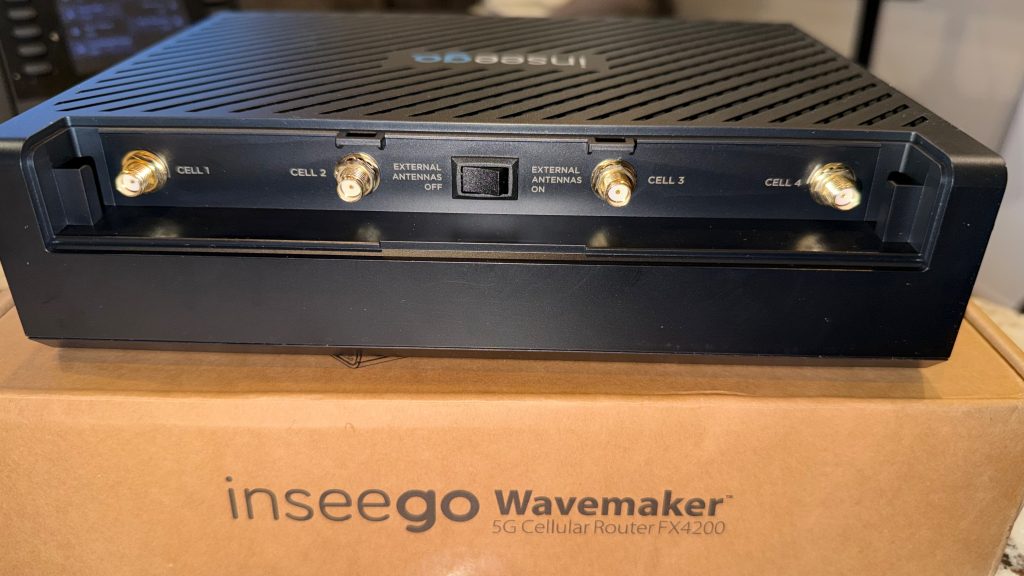
- Four external SMA connectors for cellular antennas, in addition to internal high gain antennas and integrated GPS
This layout supports a wide range of deployments. You can connect switches, firewalls, point of sale systems, cameras, or other infrastructure while still having the option to add external antennas if the router lives in a network closet instead of near a window.
Enterprise security and routing features
FX4200 is not just a plug and play router. It includes:
- Secure boot and hardware backed security
- IPsec and OpenVPN, plus VPN passthrough
- Stateful firewall, VLAN support, and both IPv4 and IPv6
- WPA2 and WPA3 WiFi security, with support for guest and primary SSIDs
These features help you segment traffic, build secure tunnels back to headquarters, and meet security requirements for government, retail, healthcare, and other regulated markets.
Cloud management with Inseego Connect
Every FX4200 can be managed locally or from the cloud. With Inseego Connect you get:
- Zero touch deployment and automatic carrier selection
- Centralized monitoring of signal quality, connected devices, and data usage
- Remote diagnostics, speed testing, and firmware control
- Policy based configuration so you can apply standard templates across many sites
For IT teams managing dozens or hundreds of locations, this greatly reduces the need for on site visits and manual configuration.
Where FX4200 fits
Because of the feature mix above, FX4200 is a strong option for:
- Primary broadband where fiber is not yet available or is too expensive
- Backup internet for locations that cannot afford to go down when their wired circuit fails
- Pop up locations such as temporary stores, events, and construction sites
- Highly distributed fleets of small offices or kiosks where central IT wants a single platform to manage
In all of these cases, you can start with just the FX4200 near your best 5G signal, then layer on mesh if you need more WiFi coverage deeper into the building.
Inseego Wavemaker X700 Mesh WiFi
The Inseego Wavemaker Mesh WiFi X700 is an optional companion node that extends wireless coverage throughout your building. Think of the FX4200 as the 5G and routing brain, and the X700 as the satellite nodes that bring strong WiFi to the corners of your space.
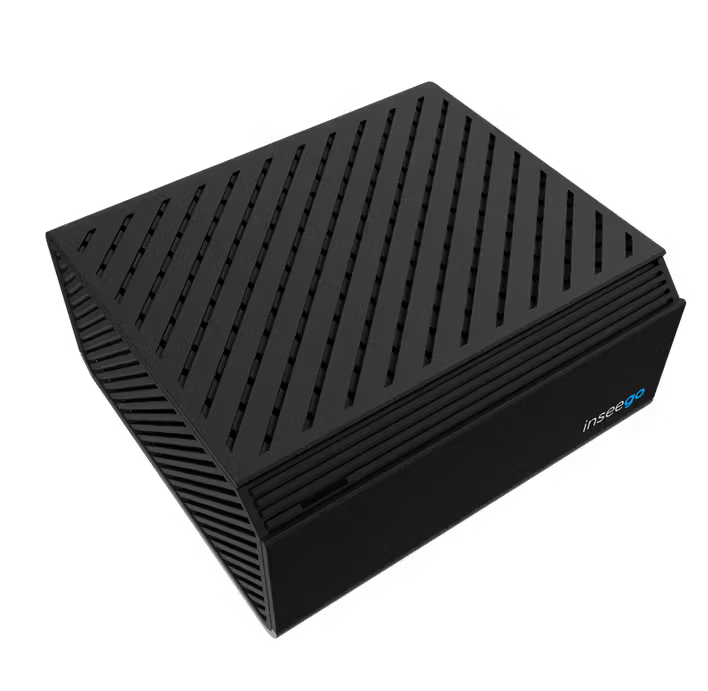
Key capabilities include:
- Dual band WiFi 6 with 2×2 radios on 2.4 GHz and 5 GHz
- Full power access point output suitable for business environments
- 160 MHz channel support on 5 GHz, with bandwidth shared between backhaul and client traffic
- Two 1 GbE LAN or WAN ports plus USB C power and data
- A front status LED that helps you place the node where both mesh backhaul and client coverage are strong
X700 nodes can connect back to the FX4200 over wireless mesh or Ethernet. You can deploy multiple nodes to create wall to wall coverage in larger offices, long floorplans, or warehouse aisles.
Management of the mesh is handled through the FX series router interface and Inseego Connect, so you do not need a separate WiFi controller platform.
In most small and mid sized offices, pairing an FX4200 with one to three X700 nodes is enough to get consistent coverage when they are placed correctly.
FX4200 + X700 example deployment
Here is how a typical deployment might look:
- Place the FX4200 near the best 5G signal in your building, often near an exterior wall or window. Use the built in display or mobile app to verify signal quality before mounting it permanently.
- Run Ethernet from the FX4200 into your existing switch or firewall if you have one, or let it act as your primary LAN router.
- Add one or more X700 nodes to fill in coverage in dead zones, back offices, conference rooms, or warehouse aisles, using either Ethernet backhaul or wireless mesh.
- Use Inseego Connect to push standard WiFi and security settings to every site, monitor uptime and data usage, and schedule firmware updates during normal maintenance windows.
Because the platform supports dual SIM, LTE fallback, and a backup battery, this same configuration works whether the FX4200 is your only internet connection or a high availability backup to an existing wired circuit.
Why customers choose this combo
From a 5Gstore perspective, the FX4200 plus X700 hits a sweet spot for customers who want:
- Carrier choice and resilience with dual SIM and advanced failover
- Modern, high performance WiFi at the core, expandable with WiFi 6 mesh where needed
- Enterprise grade security features with VPN options and traffic segmentation
- Remote cloud management so IT can support many locations without traveling
- A smooth upgrade path from older LTE routers or consumer grade modems
If you are considering a move to 5G fixed wireless, or you want to compare the FX4200 and X700 against other 5G solutions, the 5Gstore team can help you evaluate coverage, antenna options, and mesh design for your specific environment.
Looking to order from 5Gstore:
FAQ
What size battery is inside the FX4200 and how long will it run on battery?
The FX4200 includes a rechargeable 5050 mAh Li-ion backup battery that sits in a compartment on the bottom of the router.
Inseego does not publish a single “hours of runtime” spec because battery life depends on several factors, including:
Number of connected clients
Signal strength and 5G vs LTE usage
How much traffic you are pushing
Which battery modes you enable (Full Performance, Mission Critical, Low Power)
In real deployments, you can expect 2-4 hours of runtime
What SIM size does the FX4200 use?
The FX4200 uses a nano SIM (4FF) form factor.
Be sure you have a true nano SIM, not a micro SIM in an adapter, to avoid damage to the SIM slot.
What kind of throughput can I expect?
On the cellular side, the FX4200 is rated for peak 5G performance up to 7.5 Gbps down and up to 3 Gbps up under ideal network conditions. That is the theoretical maximum radio capability, so real world speeds will be lower and depend on your carrier, plan, spectrum, and signal quality.
On the LAN side, the FX4200 provides:
Wi-Fi 7 with support for up to 256 Wi-Fi clients
2.5 GbE Ethernet ports that can be configured as WAN or LAN
Optional X700 mesh nodes that add dual-band Wi-Fi 6 coverage and can use wireless or wired backhaul
The X700 itself is a 2 x 2 dual-band Wi-Fi 6 mesh node with full-power access point radios and 160 MHz bandwidth on the 5 GHz radio, giving you plenty of Wi-Fi capacity for typical branch, retail, and office deployments.
What can I see on the FX4200 built-in screen?
The front device display is more than a simple status light. It is an interactive screen that:
Shows device information and alerts
Lets you pair mesh nodes such as the X700
Lets you check for firmware updates from the front panel
Using the display button you can:
Short press (under one second) to scroll through menu options
Long press (over three seconds) to start an action or enter and exit submenus
On the display you will typically see:
Cellular status and signal strength icons
Wi-Fi status and icons for data activity
Alerts when something needs attention
Mesh prompts such as “Wi-Fi Mesh: Hold button to add” when you are pairing an X700
An antenna icon when the external antenna switch is turned on
It is designed so installers can walk a site with the FX4200 on battery, watch signal strength on the screen, and lock in the best location without needing a laptop.
How do I add an external antenna to the FX4200?
The FX4200 has nine internal antennas and four external full-spectrum cellular SMA ports (0.6 to 6 GHz each) for up to four external antennas.
To use external antennas:
Choose the right antennas
Use full-spectrum antennas that cover the FX4200’s cellular bands.
Make sure effective gain is at least 4 dBi after cable loss and that efficiency is reasonable, or performance can get worse instead of better.
Connect all four antenna leads
Connect one antenna lead to each of the four SMA cellular ports on the back. You can use four separate antennas or a multi-element antenna with four leads from a reputable vendor.
Turn on external antennas
Flip the “EXTERNAL ANTENNAS ON” switch on the back of the FX4200.
When this switch is on, the internal WWAN antennas are disabled and the external ones are used for cellular, while internal Wi-Fi and GPS antennas stay active.
Verify signal on the display
Use the device display and LEDs to confirm you are seeing equal or better signal than the internal antennas delivered.
In most cases, if you already see three to five bars of signal, external antennas will not improve performance and can even reduce it if the antenna system is not designed correctly.
How do I pair an Inseego X700 mesh node with my FX4200?
The FX4200 is designed to work with Inseego’s X700 Mesh Wi-Fi nodes to extend coverage. Here is the recommended pairing process.
Before you start
Make sure both the FX4200 and X700 are powered on.
Place them 10 to 50 feet apart for pairing. You can move the X700 to its final location later.
On the FX4200, log in to the admin web UI and go to Network > Wi-Fi and ensure Enable Mesh Network is turned on.
Option 1: Pair using the FX4200 front display
Wait until the FX4200 Wi-Fi status LED is solid green or blue.
On the front of the FX4200, press the display button repeatedly until you see the Wi-Fi Mesh prompt to add a node.
Press and hold the display button to start pairing.
Within 30 seconds, press the Mesh button on the back of the X700.
Wait two to three minutes. The X700 LED and the FX4200 Wi-Fi LED will blink blue while pairing.
When the display shows that the mesh is paired and the X700 LED is solid, pairing is complete.
Option 2: Pair using the admin web UI
On a device connected to the FX4200, open a browser and go to http://192.168.1.1 or http://inseego.local.
Go to Network > Wi-Fi, confirm Enable Mesh Network is on, then scroll to the Mesh section and click Add Node.
Within 30 seconds, press the Mesh button on the X700.
Wait two to three minutes. When the Wi-Fi status LED on the FX4200 is solid blue and the X700 LED is solid, pairing is complete.
Option 3: Pair using Ethernet
Connect an Ethernet cable from the X700 to a LAN port on the FX4200.
Wait while the X700 LED blinks blue during pairing.
When the LED goes solid, pairing is complete. You can unplug the Ethernet cable and the X700 will stay paired over Wi-Fi.
How many X700 mesh nodes can I use with one FX4200?
You can connect multiple X700 nodes to a single FX4200. Inseego’s guidance for the FX4200 platform is up to three mesh nodes per router, which is usually plenty to cover most branch offices, retail stores, and similar environments when each node adds roughly 1,000 additional square feet of coverage.
Can I manage the FX4200 and X700 from the cloud?
Yes. The FX4200 and X700 are designed to be managed with Inseego Connect, Inseego’s cloud management platform. Through Inseego Connect you can:
See all FX4200s and X700 nodes in one dashboard
View signal strength, data usage, and mesh topology
Push firmware and configuration changes at scale
Set alerts and thresholds for proactive troubleshooting
This lets IT teams support many remote sites without rolling a truck every time something needs attention.
Can I power the FX4200 with USB-C instead of the wall adapter?
Yes. You can power the FX4200 by:
Using the included AC wall adapter
Connecting the USB-C power port to a USB-powered hub
Connecting to a USB power delivery (PD) host device, such as some enterprise power systems or higher-power USB-C ports
That flexibility, combined with the internal battery, makes it easy to test locations or run the router temporarily where AC outlets are not convenient.
The Inseego Wavemaker FX4200 is a 5G fixed wireless solution that offers a robust and reliable internet connection for businesses and organizations. It is designed to provide high-performance WiFi, advanced security features, and easy mesh expansion, making it an ideal solution for a wide range of use cases, including primary broadband, backup internet, and pop-up locations.
Key Features of the FX4200:
- 5G NR with LTE fallback: The FX4200 supports 5G NR with advanced carrier aggregation and 4×4 MIMO, and automatically falls back to LTE when 5G service is not available.
- High-performance WiFi: The FX4200 features a high-performance WiFi radio that supports dual-band operation (2.4 GHz and 5 GHz), up to 256 WiFi clients, and full power access point with mesh support.
- Dual SIM, dual WAN, and battery backup: The FX4200 includes two nano SIM slots, dual WAN support, and a built-in battery that keeps the router up through short power outages and allows for easy placement testing.
- Enterprise security and routing features: The FX4200 includes secure boot, hardware-backed security, IPsec and OpenVPN, stateful firewall, VLAN support, and both IPv4 and IPv6.
- Cloud management: The FX4200 can be managed locally or from the cloud using Inseego Connect, which provides zero-touch deployment, centralized monitoring, remote diagnostics, and policy-based configuration.
Inseego Wavemaker X700 Mesh WiFi:
The Inseego Wavemaker X700 is an optional companion node that extends wireless coverage throughout a building. It features:
- Dual-band WiFi 6: The X700 supports dual-band WiFi 6 with 2×2 radios on 2.4 GHz and 5 GHz, and full power access point output suitable for business environments.
- 160 MHz channel support: The X700 supports 160 MHz channel support on 5 GHz, with bandwidth shared between backhaul and client traffic.
- Two 1 GbE LAN or WAN ports: The X700 includes two 1 GbE LAN or WAN ports, plus USB C power and data.
- Front status LED: The X700 features a front status LED that helps with placement and troubleshooting.
Deployment Example:
A typical deployment might include:
- Placing the FX4200 near the best 5G signal in the building.
- Running Ethernet from the FX4200 to an existing switch or firewall.
- Adding one or more X700 nodes to fill in coverage in dead zones or back offices.
- Using Inseego Connect to push standard WiFi and security settings to every site, monitor uptime and data usage, and schedule firmware updates.
Why Customers Choose the FX4200 and X700:
Customers choose the FX4200 and X700 for their:
- Carrier choice and resilience: Dual SIM and advanced failover capabilities.
- Modern, high-performance WiFi: Expandable with WiFi 6 mesh.
- Enterprise-grade security features: VPN options and traffic segmentation.
- Remote cloud management: Easy support for many locations without traveling.
- Smooth upgrade path: From older LTE routers or consumer-grade modems.
FAQs:
- Battery life: The FX4200 includes a rechargeable 5050 mAh Li-ion backup battery that can run for 2-4 hours.
- SIM size: The FX4200 uses a nano SIM (4FF) form factor.
- Throughput: The FX4200 is rated for peak 5G performance up to 7.5 Gbps down and up to 3 Gbps up.
- Built-in screen: The FX4200 features an interactive screen that shows device information, alerts, and allows for pairing mesh nodes.
- External antenna: The FX4200 has four external full-spectrum cellular SMA ports for up to four external antennas.
- Pairing X700 mesh nodes: The FX4200 can be paired with X700 mesh nodes using the front display, admin web UI, or Ethernet.
- Cloud management: The FX4200 and X700 can be managed with Inseego Connect, which provides a centralized dashboard, firmware updates, and configuration changes.
In conclusion, the Inseego Wavemaker FX4200 and X700 mesh nodes offer a robust and reliable 5G fixed wireless solution for businesses and organizations. With its advanced security features, high-performance WiFi, and easy mesh expansion, it is an ideal solution for a wide range of use cases.